One user = One person
A quick and easy WordPress (and other stuff) tip today. You can guess what it is from the title. Read on to find out why.
A quick and easy WordPress (and other stuff) tip today. You can guess what it is from the title. Read on to find out why.
If you work with a nonprofit and want to learn about WordPress, you get two chances next week!
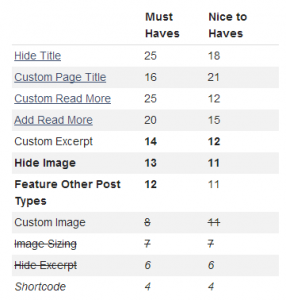
A client project leads to a tutorial to get formatted tables into a useful WordPress plugin. Hopefully this post will help someone else who’s stuck!
In the third and final part of this series, I briefly cover the basics of adding “Custom Taxonomies” to a WordPress site and offer some useful tips on how to get the most out of them.
The second part of the “WordPress & Taxonomies” series brings us to “Categories” and “Tags,” the two default taxonomies in WordPress and two frequently misunderstood features.
In the interest of saving their time and protecting their site, I always recommend that clients avoid permanently deleting content in WordPress. Luckily, there are default features that make this easy to do and plugins that make it even better!
WordPress 3.8 is out, and if you don’t see it coming, you might get smacked over the head with the drastic change in colors. However, it’s easy to change the default color scheme.
I’m going big and mocking up an entirely new idea for how a WordPress site could be edited. Too ambitious? Probably. But I’ve got to put my time where my mouth is.
Let me pull back the curtains a bit so you can see how one WordPress theme—think of it as a design—can be turned into many unique websites. In this case, the Twenty Twelve theme helped two clients get beautiful sites.
Alternative text for images is one of the easiest things to do in WordPress to increase accessibility, and yet it’s frequently overlooked. How could we fix that?
There’s a drastically-improved feature coming in WordPress 3.6 that I honestly believe could change how we blog. Seriously. Take a moment to learn a bit more about post formats and why I think they’re so great..
WordPress makes it gloriously easy to embed videos, photos, tweets, songs, documents, and other types of media from popular social media sites by simply pasting the URL into the post editor. Quickly learn the simple but powerful ins-and-outs of media embedding in WordPress.
I use WordPress a lot, and so I have strong opinions about it. I’ve watched people do amazing things with it and watched people struggle to add a single menu item to their site. So here’s me putting out an idea of how to improve a part of WordPress. What do you think?
Because there are too many WordPress tips posts out there already, I tackled today’s tip—How do I get rid of the “-2” at the end of a post slug (e.g. “example.org/about-us-2/”)—in verse. I apologize in advance.
It’s a big scary world out there, full of monsters, ghosts, faceless multinational corporations, and WordPress plugins THAT HAVEN’T BEEN UPDATED IN TWO YEARS!!! OH THE HUMANITY! Take a moment and review why you need to be careful about what plugins you use.
WordPress plugins are amazing. They’re one of the biggest reasons I use WordPress: Every time you install WordPress, you have a world of free and cheap plugins that make WordPress better—as long as you use good plugins, that is. But even the most amazing things are best in moderation.