
May 14-15 I attended the Washington State Nonprofit Conference online. As I love to do, I took notes during sessions I attended so I could share them with you!
I was also happy to be a presenter with my “Test your website’s accessibility starting…NOW!” and do an “Ask Me Anything” about nonprofit websites.
Common Nonprofit Mistakes, Errors, and Failures—and What to do About Them
Livio De La Cruz and Khyree Smith from Communities Rise
Note: Some of these tips veer into legal issues. I am not a lawyer and this presentation wasn’t legal advice. I’m doing my best to faithfully summarize the presentation below, but don’t take it as a guarantee.
- Collecting basic program data at the start (things like attendance) can be very helpful for proving impact for grants and getting new grants in the future.
- Have a privacy policy! If you collect emails for a mailing list or have a contact form, then you need a privacy policy. And most importantly, make sure that your privacy policy is actually followed. I’ve written about why privacy policies are hard to write and recommend my notes from a Data Privacy talk at 23NTC.
- Works created by volunteers and board members such as logos, graphics, websites, etc. are owned by the person who created them and not the organization. Make sure you have an “Intellectual Property Agreement” that clarifies who owns the rights. Communities Rise is awesome and provides a template for this document.
- This includes when multiple people are working on something and can include people who do something as small as proofreading a document.
- The nonprofit automatically owns work created by employees. For contractors, it will depend on the language in contracts.
- Make sure to classify employees correctly. People who do the core functions of your organization, even if it’s temporary or part-time, are often employees. Independent contractors (like me!) have their own business and many other clients. Independent contractor status is not a loophole around employment law!
- Communities Rise has a video recording of their presentation, “Understanding your Nonprofit’s Legal Obligations as an Employer”.
- They discussed the interesting topic of compensating volunteers. This is an important topic because it’s seen as a way of improving equity and fairness for people who are doing critical work. However, paying volunteers and board members is very risky and complicated. Unfortunately, the law is not catching up to the culture change.
- Board members are basically unpaid volunteers in the law’s eyes. For board members, paying them can look like “self-dealing” to the IRS and risks the organization’s tax-exempt status.
- For Volunteers, you risk creating an employment relationship if you pay them. Employment incurs all sorts of taxes and legal rights you may not be meeting. Paying volunteers can also accidentally expose them to personal liability risks.
- Potential solutions:
- Have a reimbursement policy to cover costs associated with volunteering.
- If people want to deduct their expenses as a donation, then you have to get documentation of the expense and then provide acknowledgement of the donation.
Human-Centric AI: Centering Community to Build an Inclusive Future
Meena Das from Namaste Data
Meena also just posted an article on the Community-Centric Fundraising site: “A call for responsible AI that leads with care and imagination”.
Meena asked us to answer each of these six questions (1 point per “Yes”):
- I understand the data that we collect at my work.
- I am confident in me and my team’s ability to manage and protect sensitive data.
- We, at our work, review data policies and procedures to ensure compliance with data privacy regulations.
- We employ strategies to ensure that the data we collect and analyze is representative and inclusive of the communities we serve.
- I am confidant of how we collect data and then use to measure equity-centered impact.
- I am confident of how we share back results of all data collection with our community.
The results:
- 10% – 6
- 33% – 4-5
- 57% – 1-3
- 0% – 0
These are the same components of equity in AI.
Examples of how AI might be used in nonprofits
- Identifying potential donors for major gifts
- Donor engagement
- Task Automation: e.g., donor newsletter
- Volunteer engagement
- Program delivery
It’s useful to think about how AI impacts:
- Internal (staff)
- Core systems (the organization itself)
- External (donors, subscribers, constituents)
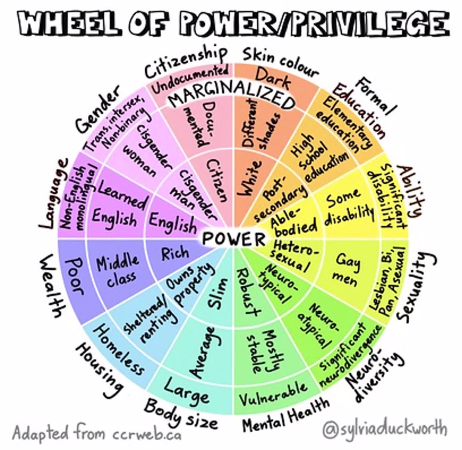
Issues with AI
- Many designs allow exclusion of non-majority views
- Can perpetuate social biases
- They are opaque
- Lack of collective alignment on how we want to use AI as a society
We are responsible for AI use at societal, organizational, and individual levels.
When using AI…
- Listen to community needs
- Center the “Why” for using AI. That should drive the values of both how you use it and what you do with any saved time.
- Be transparent about the use of AI with your constituents (have a policy) and ask for feedback
- Create an “AI governance/evaluation framework”
- Make sure you understand your data
This dovetails very nicely into the just-released “Artificial Intelligence Framework for an Equitable World” from NTEN.
Ask yourself: What do “I” and “we” need to do to approach AI in a humanity-first way? How can we move away from the sense of competition, fear, and deficit to collaboration, confidence, and strengths regarding the algorithms around us?
Meena has posted “Community-Centric AI Principles” on her website.
My Presentation: Test your website’s accessibility starting…NOW!
Me
I worked with a dozen or so super-engaged folks to present the same accessibility session I gave at NTC. I’ve now presented this session online and in-person, and I was once again quite happy with how it went.
If you’re interested in the slides, testing notes/checklist, and additional resources, I’ve put them together in a mini DIY accessibility testing website.
Poll on accessibility accommodations awareness
The conference platform allowed me to poll people looking at my session, so I asked “Which website accessibility standards are you familiar with? (Check all that you’re confident you understand)”.
Here are the results:
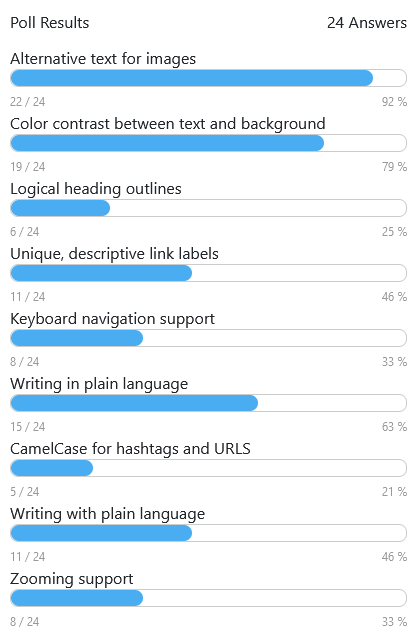
| Accessibility Support | Aware (n=28) |
|---|---|
| Alternative text for images | 26 |
| Color contrast between text and background | 23 |
| Logical heading outlines | 9 |
| Unique, descriptive link labels | 13 |
| Keyboard navigation support | 9 |
| Writing in plain language | 19 |
| CamelCase for hashtags and URLs | 6 |
| Zooming support | 10 |
It was interesting to see that the two things I teach in this presentation (keyboard navigation and heading outlines) were two of the techniques with lowest awareness. That’s probably why I’m always so frustrated on these issues, but it’s also great that I’m meeting a big need with this presentation.
Beyond One-Size-Fits-All: Tailoring No-Code Tech for Nonprofit Success (aka: F’ Salesforce)
Elizabeth Geri from Whit & Wittle, LLC and Nam-ho Park from University of Washington Information School
What is no-code and why is it useful?
Nam-ho started with a comparison between the Museum of Pop Culture (MoPOP) and an anonymous McDonald’s. One is built extremely custom for a single, specific purpose. The other is repeatable and cheap. You can think of this on two axes of customization and cost:
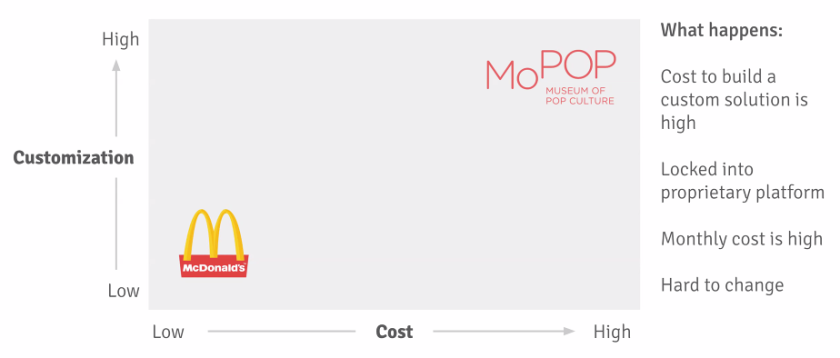
A lot of existing, prebuilt solutions are optimized for for-profit business and may not work as well for nonprofits.
“No-code” approaches are an attempt to find a solution that manages cost but allow for customization and evolution over time. IKEA provides a perfect metaphor of the in-between no-code approach: everything comes in components that can be assembled and combined in different ways by the person choosing them.
No-code is:
- No coding background needed
- Subscription-based online platforms
- Well documented
- Good templates and examples to start
- Frequently incorporate advances in AI
Frequently, the benefits of no-code are:
- Lower cost to develop and manage
- Less vendor lock-in around platform
- Trained staff can manage, maintain, fix, grow
- No custom code to maintain
- Reap benefits of ongoing advances in technology
- Can grow, adapt with the organization
- Secure, scalable, integratable, automatable
Examples of no-code
There are many more tools than these, but here is a set of common examples used in no-code solutions:
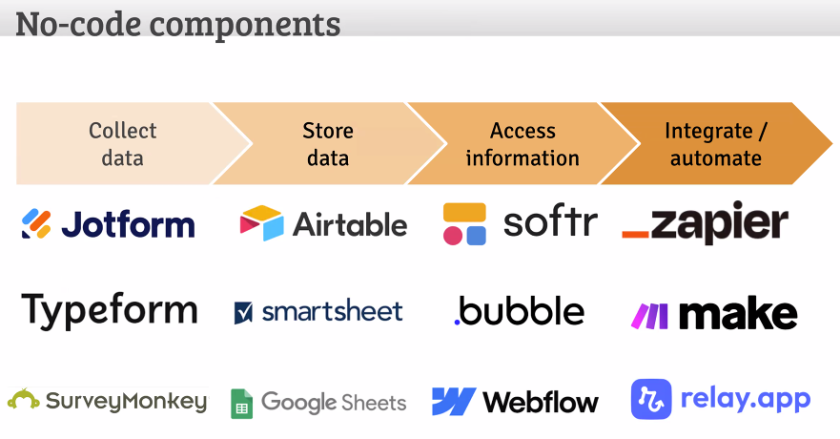
Here are a few examples of real projects that use this approach.
HazingInfo.org
Collecting information about hazing incidents at higher-education institutions. That data is often delayed, people want really different things from the data, and the student team building the project had varying technology abilities.
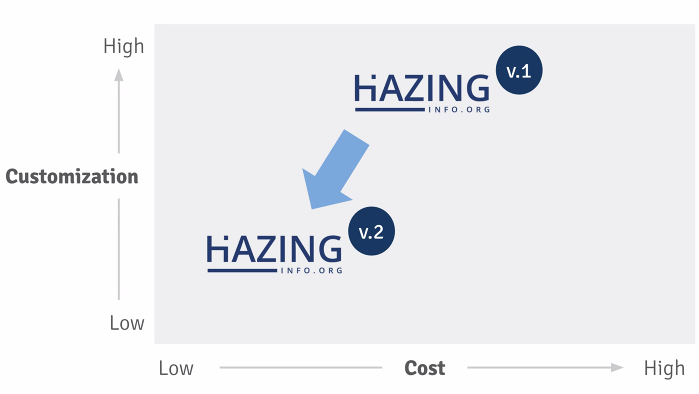
This project started with a version 1 that was totally custom. The second version was built with no-code tools.
The v2 site gathered news alerts, coded them with AI to tag with schools, and then created a review to let someone review the AI results and publish to the site.
The site used Airtable for data collection via Google Alerts, data storage, and email registration. The site used Softr for displaying the data, school and state policies, and additional resources.
Other projects:
- A diaper bank tracking usage, allowing sign in, and showing analytics.
- A bike repair and training nonprofit improving their backend workflows by integrating with their existing database.
Pitfalls and risks of no-code
- “IKEA is not easy” – Lots of planning and some assembly required!
- “More is not always better” – You must know your “core features” vs. “nice to haves”. Don’t fall into feature creep.
- “Manage” – The building isn’t actually the hard part. Maintenance, growth, and staff capacity are all critical to consider.
How to get started
Think hard about your capacity. What can you do in-house and where are your limitations of knowledge and capacity? Some key parts of the work:
- Identifying the problem
- Building the solution
- Ongoing maintenance and training
- Planning for growth and change
You can balance each of these tasks between staff and consultants.
In conclusion, they are hoping to put people’s needs first and find technology solutions that support them, not the other way around. That I can truly get behind!
Yay learning!
I enjoyed all four sessions I attended/presented, and I’m looking forward to more! I’ll be at the Seattle in-person event next week, and I’ll be doing an “Ask Me Anything” about nonprofit websites tomorrow (Thursday, May 16) on the conference app. I hope to see you there!